YoLink
Werbung
Bildschirmfotos
3 Bilder
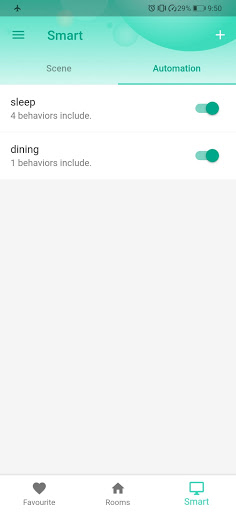
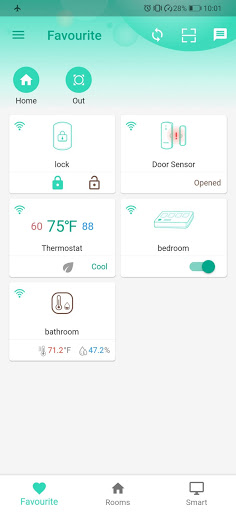
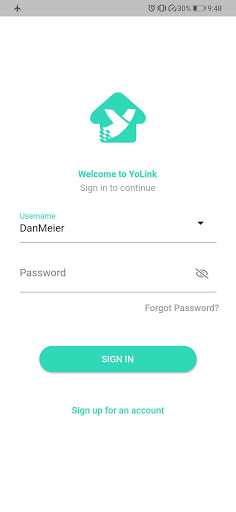
Übersicht
Beschreibung der YoLink App
Die YoLink App wird von YoSmart Inc. veröffentlicht und stellt eine innovative Lösung für die Steuerung und Automatisierung von Smart-Home-Geräten dar. Mit dieser leistungsstarken Anwendung können Nutzer ihr Zuhause in eine intelligente Oase verwandeln und verschiedene Geräte nahtlos miteinander verbinden. Die App ist eine zentrale Plattform, die die Steuerung sämtlicher YoLink-Geräte über einen YoLink-Hub ermöglicht, was die Nutzung von smarten Technologien im Alltag erheblich vereinfacht.
Vielseitige Geräteverwaltung
Mit der YoLink App können Anwender eine Vielzahl von intelligenten Geräten bequem steuern. Zu den unterstützten Geräten gehören Smart Switches, Smart Outlets, Manipulatoren und Türsensoren. Diese Geräte ermöglichen es, das Zuhause auf effiziente und komfortable Weise zu automatisieren. Durch die zentrale Steuerung über die App können Nutzer beispielsweise Lichter, elektrische Geräte oder Sicherheitsvorrichtungen mit nur wenigen Klicks bedienen.
Intelligentes Zuhause und Heimautomatisierung
Das Konzept des Smart Home wird durch die YoLink App deutlich erweitert. Es wird auch als intelligentes Haus oder Heimautomatisierung bezeichnet. Die App nutzt das Internet der Dinge, um eine vernetzte Wohnumgebung zu schaffen, die nicht nur den Komfort erhöht, sondern auch die Energieeffizienz steigert und die Sicherheit verbessert. Durch die einfache Integration verschiedener Geräte und die benutzerfreundliche Steuerung wird das Zuhause zu einem intelligenten Raum, der individuell auf die Bedürfnisse seiner Bewohner zugeschnitten ist.
Top empfohlene Alternative
Vorteile und Nachteile
Vorteile
- User-friendly interface
- High device compatibility
- Dependable long-range connectivity
- Energy-efficient operation
- Real-time notifications
Nachteile
- Limited third-party integrations
- Requires a hub for complete functionality
- App interface can be improved
- Occasional connectivity problems
- Subscription may be required for certain features
Werbung
YoLink herunterladen


Beim Klick auf die Schaltflächen oben werden Sie zur offiziellen Website weitergeleitet, um den Download abzuschließen.
FAQ
What is YoLink and what are its main features?+
YoLink is a smart home automation application that allows users to remotely manage various devices via their smartphones. Its key features include seamless integration with a wide range of smart home products, real-time alerts, and customizable automation options. The app also supports voice control through platforms like Amazon Alexa and Google Assistant, enhancing user convenience and ease of use.
Is YoLink compatible with my current smart home devices?+
YoLink is designed to work with a variety of smart home devices such as lights, thermostats, security cameras, and more. It supports major brands and communication protocols, making it easy to integrate into existing smart home setups. However, it is recommended to verify device compatibility by checking the specific list on the YoLink website or within the app.
How secure is the YoLink app in terms of data privacy?+
YoLink prioritizes data privacy by employing strong security measures to protect user information. The app uses encryption protocols to secure data during transmission and storage. It also regularly updates its security features to address potential vulnerabilities, and users can enable two-factor authentication for additional protection of their smart home systems.
Can I control YoLink devices when I’m away from home?+
Yes, the YoLink app allows for remote control of your smart devices. Whether you are at work, on vacation, or elsewhere away from home, you can monitor and manage your devices, adjust settings, receive notifications, and create automation routines based on your preferences and schedule.
What kind of customer support does YoLink offer?+
YoLink offers comprehensive support resources including online guides, FAQs, and instructional videos. For more assistance, users can contact support via email or phone, where knowledgeable team members are available to help troubleshoot technical issues or provide advice to optimize your smart home system.
Das könnte Ihnen auch gefallen
Weitere Apps, die Sie als Nächstes ausprobieren können.